TED Studies Instructional Material

A new free resource is now available to help integrate content from TED talks into your courses called TED Studies. TED Studies combines recorded TED video sessions on a given topic and adds essays, key terms, debate topics, assignment questions, activities, and other instructor materials to round out each set of programs.

TED teamed up with publisher John Wiley & Sons to create PC and iPad-based content that can be used to support lessons on happiness studies and statistics, with more on the way. Additional topics planned for future release include:

  • Government and Politics: Cyber-Influence and Power;
  • Linguistics: Exploring the Evolution of Language;
  • Marine Biology: Deep Oceans;
  • Media & Journalism: Covering World News; and
  • Urban Design: The Ecology of Cities.

For more information about more courses that are available, please visit Ted Studies.

If you have questions on how to best use this in your course, contact the Learning Technology Center.

Upcoming D2L Course Cleanup

In order to maintain optimal storage capacity, and ensure the ongoing smooth operation of D2L, the UW System conducts an annual purge of older courses from the system. This year, we are beginning preparation for courses from Fall 2008 through Summer 2010. Courses that are in this time frame will be purged from the D2L system beginning on May 3, 2013.

Things to keep in mind for the Cleanup process:

  • Only courses from Fall 2008 through Summer 2010 will be affected by this year’s Cleanup. Any courses that don’t fall in that time frame, including courses that are “OTHER” or “ONGOING” designated, are not affected.
  • Course materials or student information in courses can be exported if they’re needed for future courses or analysis. If you need assistance with exporting these items, please review the “How To” section of the D2L Cleanup Resources website.
  • Course components and materials can also be copied to an “OTHER” or “ONGOING” course shell if you plan on using the same materials for future courses. To complete a request for one, use the “Special Course Request” section of the D2L Course Request application.
  • If a special circumstance exists where a course that is slated for cleanup needs to be maintained as is (this is usually for reasons other than retaining course materials or student information), please complete and submit the Course Cleanup Retention form before April 26, 2013.

If you have any questions about the D2L Course Cleanup process, please review the Frequently Asked Questions section of the D2L Cleanup Resources site as your question may already be addressed there. If you still have questions or need assistance, please contact UW-W D2L Support.

Media Lab Specialty Printing

Starting on May 28th, 2013 the iCIT Media Lab will only be accepting purple points for faculty and staff specialty printing (color prints, poster prints, and laminations).  The ability to charge departmental and project org codes will still be available.

We have produced a short video that explains the changes and also the general printing process.

Additional information is available on the Media Lab website.

The Media Lab printing services are available for use by all students, faculty and staff.  Any questions regarding this can be directed to: medialab@uww.edu

Did you know? – D2L Browser Support

Having issues with D2L? Did you know that in order for D2L to work to its full potential, it needs to run on a supported browser?  We recommend that if you are having issues make sure that your browser has been updated to a supported version before contacting D2L Support. Below is a list of the browsers that are supported by D2L:

Operating System Browser Version Status
Windows Internet Explorer 10 Investigation
9 Supported (recommended)
8 Maintenance
7 Unsupported
Firefox Newest Supported (recommended)
10.0 Maintenance
Chrome Newest Supported
Operating System Browser Version Status
Mac OS X Safari 5.1 Supported
5.0 Maintenance
4.0 Maintenance
Firefox Newest Supported (recommended)
10.0 Maintenance
Chrome Newest Supported

A complete list of supported browsers and portable/mobile devices is available at: D2L Platform Requirements.

If you have any additional questions or concerns, please contact UW-W D2L Support.

March 13th Technology Showcase: Get Real with Technology

The Central Regional Instructional Technology Showcase for Spring 2013 presents “Get Real with Technology” on Wednesday, March 13,2013 at UW-Stevens Point from 8:45AM to 3:15PM. This event includes keynote speaker, Dr. Rovy Branon, from the University of Wisconsin-Extension in Madison, breakout sessions, a panel discussion and final group activity.

Registration is requested by March 9, 2013, and is limited to 80 attendees.

This event is free and includes lunch. Details and registration are available at: http://www.uwsp.edu/infotech/Documents/Faculty%20Services/2013UW-SystemCentralRegionalConference.pdf

2013 OPID Spring Conference Registration Available

Registration is now open for the 2013 OPID Spring Conference: The Value of Inquiry into Student Learning in the 21st Century being held on April 18th through 19th.

The 2013 OPID Spring Conference will bring together over 200 faculty and staff across many disciplines to demonstrate the UW System’s commitment to excellence in teaching and student learning.   The conference will provide a forum to recognize, acknowledge, and share the expertise of faculty and academic staff who excel at teaching, value learning, and are committed to sharing their experience, knowledge, practice, and scholarship with colleagues.  The intentional relationships among teaching, learning, and making excellence inclusive will be a foundation of this event.

The OPID Spring Conference will feature the following keynote presentations:

  • Learning matters: Reflections on valuing inquiry in Wisconsin (1999-2013) by Tony Ciccone, Professor of French and director of the Center for Instructional and Professional Development (CIPD) at the University of Wisconsin-Milwaukee.
  • Stereotype Threat and The Psychology of Achievement Gaps: Causes and Solutions to Student Underperformance by Valerie Purdie-Vaughns, Assistant Professor of Psychology at Columbia University

For more information about the conference at-a-glance, please visit http://www.uwsa.edu/opid/conf/springconf13.htm.  The final program and detailed conference agenda is being created now and will be sent to you via email and posted on OPID’s website.

To register for the conference, please go to: http://www.jotform.com/?formID=30433439588966.  To make hotel reservations for the conference, please call the Concourse directly at 800-356-8293. Please register and make your reservations by March 29th.

If you have any questions about the registration process or the conference in general, please contact at: opid@uwsa.edu

FUSION 2013 – D2L Users’ Conference

Instructional faculty and staff are invited to register and attend FUSION 2013, Desire2Learn Inc.’s annual users’ conference.

The FUSION conference is attended by individuals in various roles and there are multiple tracks for many presentations that are designed specifically for each role. Sessions are largely classroom style and are presented by attendees as well as Desire2Learn staff. There are also poster sessions, hands-on sessions for attendees to actively participate in learning, focus groups, and in-depth roundtable discussions.

This year’s FUSION is being held in Boston, Massachusetts on July 15th through the 17th. For more information and to register, please visit the Desire2Learn FUSION conference website.

Feb 22nd Keynote: Evidence-Based Approach to Multimedia Learning

As part of the 2nd Annual Northwest Regional Instructional Technology Showcase, Dr. Richard E. Mayer’s will be giving a presentation titled “What Instructors Should Know about Taking an Evidence-Based Approach to Multimedia Learning”.

Mayer’s presentation will be streamed LIVE tomorrow Friday, February 22, from 9 a.m. to 10, CST. Participants MUST register prior to the presentation.

To register for this event, please take the following steps:

  1. Click on the following link: https://uwstoutevents.webex.com/uwstoutevents/onstage/g.php?t=a&d=665333438
  2. Click “Register” on the left-hand side of the screen.
  3. Enter your “First Name, Last Name, Email Address,” and then “Confirm Email Address.” Click “Submit.”
  4. Read the Confirmation page and click “Done.” You will receive a confirmation email shortly thereafter. Follow the directions in the email to enter the event.
  5. The Event Password is: nwritkey

Please contact Nathan Castillo at castillon@uwstout.edu if you experience difficulties getting into the event.

Summer 2013 D2L Course Requests Open

Summer 2013 D2L course requests are now available in the D2L Course Request application.

As a reminder, course requests for a semester become available on the first day of priority registration for students, and course shells for D2L need to be requested for every semester you plan on using D2L.

If you have any questions or concerns, please contact UW-W D2L Support.

Copying Grade Items in D2L

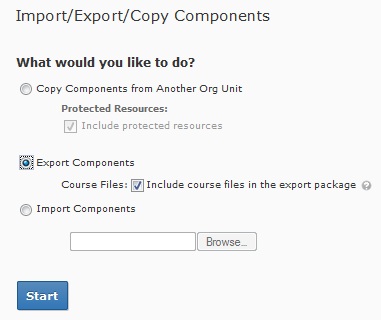
Currently we are aware of an issue where instructors cannot copy gradebook items and/or categories from any previous course offering using Copy Components.  The workaround is to use Export and Import Components functions instead. Learn@UW is pushing for a fix to have the Copy functionality restored for Gradebook items.

  1. Navigate into the old course that you would like to Export grades from
  2. Click on “Edit Course” and in the course administration page click on “Import/Export/Copy Components
  3. Check mark “Export Components” then click on “Start
  4. Check mark “Grades” and you can can either export all of the items or select individual items to export. Then click on “Continue
  5. Confirm the components to export and then click on “Continue
  6. Once you see the green check marks then click on “Finish
  7. Under the Export Summary, click on the blue link that says “Click here to download the export Zip package” and save it to your computer. Click on “Done
  8. Next, navigate to the new course that you would like to import the Zip package to
  9. Click on “Edit Course” and in the course administration page click on “Import/Export/Copy Components
  10. Check mark Import Components and “Browse” for the Zip package file. Next Click on “Start”
  11. Once you see the green check marks then click on “Continue
  12. Select the components from the file you would like to import and then click on “Continue
  13. Once you see the green check marks then click on “Finish“. Then click on “Done

If you have any questions or concerns, please contact UW-W D2L Support.